

The tool · runs in your browser
Open NexaPair and try it with fictional data.
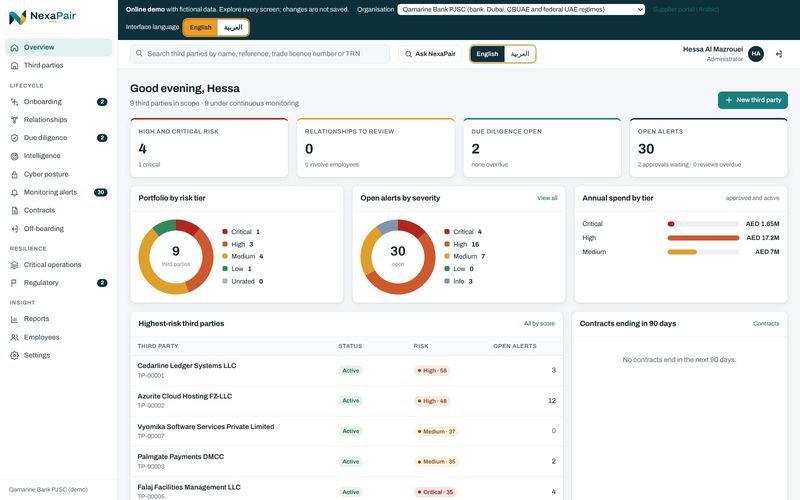
This is the product itself, running entirely in your browser with an invented company and invented vendors. Explore every screen. Nothing you change is saved.
Opens demo.nexapair.ae · best on a laptop or desktop screen
Which edition you will see
It opens in Qamarine Bank PJSC, a fictional Dubai bank supervised by the CBUAE, with the UAE edition switched on: the regime pack and readiness, incident notices across regimes, UAE vendor checks, sanctions screening against the UAE and UN lists with freeze and report clocks, questionnaires with evidence review, cyber posture and the Arabic interface. Switch between English and Arabic in the top bar. The organisation menu also has Lumen Crest Capital, a fictional DIFC firm, Noorvale Bank PJSC and two Indian demo companies. Text the system writes itself, such as alert titles, stays in English.
About this demo
- It runs in your browser. No account, no sign-up.
- All companies, people and numbers are invented.
- Changes are not saved. Reload to start again.
- New releases of the product replace this demo at the same link.
Eleven things to try
- 1Find the riskiest vendor On the Overview, open the top row of the highest-risk list and read why its score is what it is.
- 2Review a hidden link Open Relationships, pick a link that involves an employee, and confirm or dismiss it with a note.
- 3Read an AI risk brief Open a due diligence case and generate the brief. The demo bar lets you switch between the built-in engine and Claude, using your own Claude account.
- 4Work an alert Open Monitoring alerts, take one, and resolve it with a note for the audit trail.
- 5Onboard a new third party Choose New third party, answer the questions, and see the tier and checks it receives.
- 6Trace the Board pack Open Reports, then the Board pack, and follow a number back to its record.
- 7Decide a possible sanctions match In Qamarine Bank, open Regulatory, then Sanctions (TFS). A director has a possible UN-list match: record a decision and see the payment hold and the freeze and report clocks it starts.
- 8Read a vendor's cyber grade Open Cyber posture, start with the worst grade, and see each finding with its fix guidance and what has been shared with the vendor.
- 9Switch to Arabic Use the English and Arabic switch in the top bar. The staff screens turn right to left; names and records keep their own language.
- 10Map a critical operation Switch the organisation to Noorvale Bank PJSC, open Critical operations, and follow CO-01 to the providers and subcontractors behind it.
- 11Work a CBUAE incident notice In the CBUAE pack, read the Readiness tab, then open Incident notices and see each notice against its clock.
What is inside
Overview
Risk tiers, links to review, open due diligence and alerts on one screen.
Third parties
Every vendor, supplier, agent and partner, with tier, status and open issues.
Onboarding
New requests with their questionnaire, tier, checks and approval chain.
Relationship intelligence
Links between vendors, and between vendors and employees, with the evidence.
Due diligence
Screening cases whose depth follows the tier, with the AI risk brief.
Monitoring alerts
New screening hits, risk changes, renewals and overdue obligations.
Intelligence
Outside-in signals from connected sources. The demo uses invented ratings.
Contracts
Agreements, renewal dates, notice periods and obligations.
Off-boarding
Exits with access removed, data returned and contracts closed.
Reports and Board pack
Portfolio views, concentration, registers and the Board report.
Critical operations
Each critical operation with its tolerance, recovery times and a dependency map of providers and subcontractors.
CBUAE pack
Readiness against C 1/2026, incident notices against their clocks, exit plans and non-objection requests.
Regulatory
Readiness for each UAE regime you select, incident notices across regimes, sanctions (TFS) cases, data transfers, exit plans and non-objection.
Questionnaires
Questionnaires in Arabic and English, with AI evidence review that a person signs off and remediation the vendor answers.
Cyber posture
Every vendor's outside-in grade, worst first, with findings, history and what was shared with the vendor.
Employees
Your people, used only to find conflicts of interest.
Settings
Users, the risk model, workflow rules, screening sources, API keys, webhooks and the audit log.
Live in the demo for the UAE bank
- LiveUAE requirements pack for seven regimes: CBUAE, DFSA, FSRA, CMA, VARA, government and federal
- LiveReadiness view for each regulator, also in the Board pack
- LiveIncident reporting clocks across regulators: CBUAE, ADGM and the "immediately" rules
- LiveUAE trade licence record with evidence review and expiry alerts
- LiveTRN format check with EmaraTax evidence
- LiveBeneficial owners at 25% or control, declared and screened
- LiveScreening against the UAE Local Terrorist List and the UN list, with freeze and goAML report clocks
- LiveCross-border transfer assessment under the PDPL or the DIFC and ADGM data protection laws
- LiveQuestionnaires in Arabic and English with AI evidence review that a person signs off
- LivePassive outside-in cyber posture: an A to F grade per vendor, history, scheduled re-checks and grade-drop alerts
- LiveFull Arabic interface, right to left, for staff and the supplier portal
- LiveCritical-operations register
- LiveVendor and subcontractor (fourth-party) mapping
- LiveEquivalent-resilience and concentration checks
- LiveExit plans
- LiveMaterial-change notice and non-objection gate
- LiveMaster-system-of-record location check